



Scrolling Marquee Widget
Give your favorite words a little room to move.
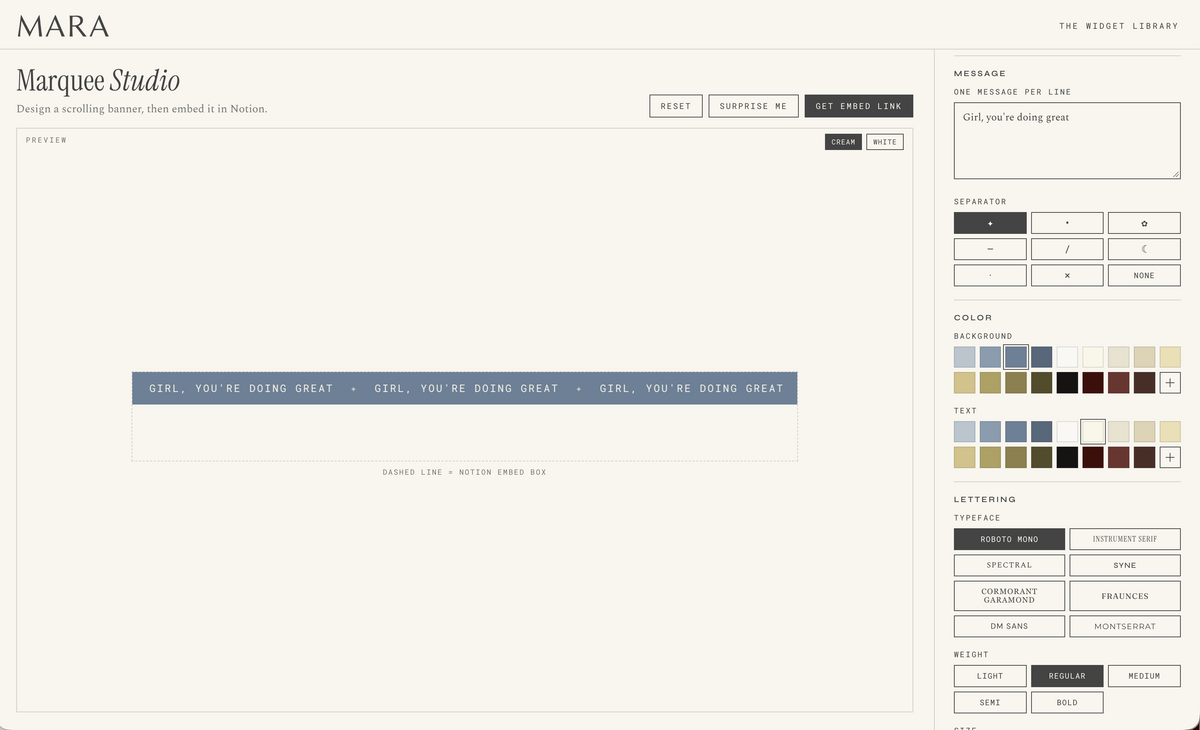
Create a customizable scrolling banner for your Notion pages, whether it’s a little reminder, a favorite phrase, or simply a playful design detail.
Choose your lettering, colors, edges + motion to make it your own.
Try the demo: marquee.marastudio.co
Play with every option before you buy. Saving + embed links unlock with your purchase.
Make it yours
- Messages: one per line, with a separator of your choice in between
- Style: background + text colors, typeface, weight, size + letter spacing
- Edges: straight, torn, tape, ribbon or boxed, or no fill for type only
- Border + bar height to fit your page
- Motion: speed, direction + an optional pause on hover
- Transparent background around the bar
How to add it to Notion
- Write + style your banner in the studio.
- Copy your embed link.
- In Notion, type /embed, paste your link + set the block height.
Good to know
- Make a few with different messages for different pages.
What’s included
- Access to the builder + instructions for getting started.
- Digital delivery after checkout. A free Notion account is all you need to get started.
Want more ways to customize your space? Explore all 12 tools in The Widget Library.
License + Usage
For individual use in your own personal + professional workspaces. You may customize and duplicate these resources for your own use. Original or modified products, assets, widgets, and access links may not be resold, redistributed, shared with others, or incorporated into products or templates intended for sale or distribution (paid or free).

Choose options